
24 September 2025
New Global Settings options for counterparty management
New Global Settings with options for automatic counterparty identification and creation via AI.
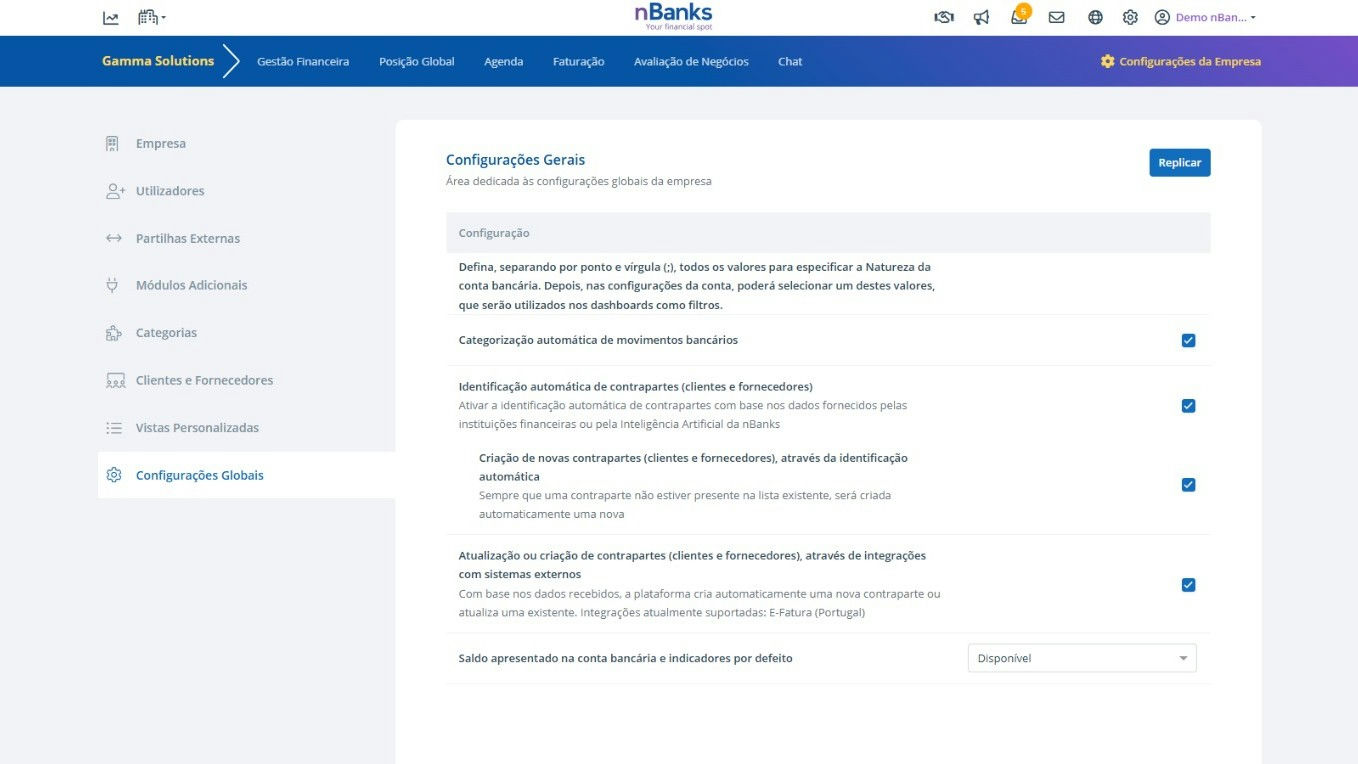
nBanks now offers new Global Settings options, allowing users to define how they want to manage the identification and creation of counterparties (customers and suppliers) through Artificial Intelligence and external integrations.
Until now, users could manually import a list of counterparties via Excel file or API. With these new settings, they gain greater flexibility and automation in the process.
1. Automatic identification of counterparties (customers and suppliers)
When this option is enabled, nBanks' Artificial Intelligence automatically identifies the counterparties associated with each bank transaction, based on information provided by the banks.
2. Creation of new counterparties (customers and suppliers), through automatic identification
In addition to identification, users can choose to allow nBanks' Artificial Intelligence to create new counterparties whenever they are not present in the existing list of customers and suppliers.
3. Updating or creation of counterparties (customers and suppliers), through integrations with external systems
Another available option is the possibility to update or create counterparties based on external integrations, such as E-Fatura. This way, the system ensures that the information remains consistent and up-to-date.
Benefits:
- Greater flexibility in counterparty management;
- Automation of the process of identifying and creating new counterparties;
- Reduction of manual work and associated errors;
- Seamless integration with external systems like E-Fatura;
- Improvement in the quality and reliability of financial data;
- Greater user control, by being able to activate or deactivate these options according to their preference.
Available in all geographies.
You can try this feature here.